.png?width=100&height=75&name=Logo%20wit%20(1).png)
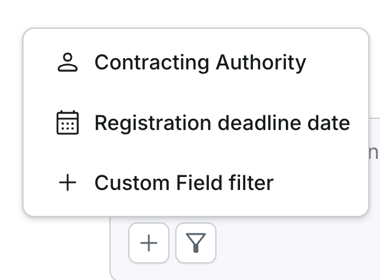
New: Filters in Bid Companion You can now define exactly which projects Bid Companion looks at. The Bid Companion chat window includes a filter bar that lets you scope every question about historical proposals to a specific subset of your projects, so answers, citations, and search results only come from the projects that matter to your current bid.
Filter projects by Contracting Authority, Registration Deadline, and Custom Fields. Active filters are shown in the chat window so you always know what's being included. Once you set a filter, every follow-up question in that chat respects it automatically, no need to repeat yourself or scope each prompt manually.
Improved: New Opportunity Lists: A full visual and structural overhaul of how you manage your new opportunity lists in settings.
- Dedicated edit page — Creating or editing an opportunity list now happens on its own page, with explicit Save and Cancel buttons. No more inline editing in between all your lists.
- Search and pagination — Quickly find a specific list with a search box, and paginate through long lists instead of scrolling endlessly.
- Cleaner table layout — Search profiles are shown in a proper table with their associated filters as tags, and visual separators between each opportunity list.
- Always-visible actions — Edit and delete actions on each row are now always visible instead of only appearing on hover.
Bug Fixes
- New Opportunities — Saving filters without entering a list name no longer silently discards your changes. You'll see a clear warning to fill in a name, and your filter selection is preserved.
- New Opportunities — The Clear button inside a filter no longer auto-saves immediately. Your changes are only saved when you confirm them, so an accidental click can be undone.
- New Opportunities — The Auto archive toggle (with days and rejection reason) is now correctly saved when you create a new list, not just when editing an existing one.
- Bid Companion — The accordion menu in the Prompt Library is back, making it easier to navigate all the prompts.
- Projects — Files downloaded from the document preview screen now keep their original filename, instead of being saved with an internal system ID.